Excel 2003 just the steps for dummies
Diane Koers · 2006
איפה לקנות
המחיר באמזון משתנה מדי יום, אז הכי נכון לראות אותו שם ברגע הקנייה.
לצפייה באמזוןזה קישור שותפים: כשקונים דרכו, האתר מקבל עמלה קטנה בלי תוספת במחיר עבורכם, וזה עוזר לנו להביא תוכן איכותי ולתחזק את האתר. בתור שותפים של Amazon אנחנו מרוויחים מרכישות מתאימות.
על הספר
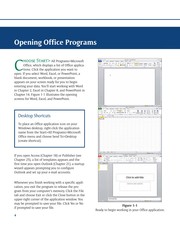
Easy steps for creating spreadsheets you can really use Simple steps... ...for great results Use AutoOutline Choose Data Group and Outline AutoOutline. Figure 11-9 illustrates a worksheet with outline headings for both rows and columns. Row outline symbols are at the top of the worksheet. AutoOutline works best if the worksheet has summary formulas that reference cells in the detail cells. The summary formulas must be adjacent to the detail. To expand the outline, click the Show Detailbuttons to the left of the rows or above thecolumn headings. (See Figure 11-10.) To collapse the outline, click the Hide buttonsto the left of the rows or above the columnheadings. To remove the AutoOutline, choose Data Group and outline Clear Outline. Get ready to Format cells and data
פרטי הספר
- שנה
- 2006
- שפה
- English
- סדרה
- --For dummies
- הוצאה
- Wiley
- מהדורות
- 4
- עמודים
- 209
- ISBN
- 9780764574887
מקור הנתונים: Wikidata
עוד של Diane Koers